

74% of retail investor accounts lose money when trading CFDs with this provider
- Good Money Guide experts rate XTB CFD Trading highly, noting its comprehensive suite of trading tools and educational resources that cater to both novice and experienced traders. The platform's unique features, such as the ability to close multiple positions simultaneously and a robust post-trade analysis tool, enhance the trading experience. However, some limitations include the absence of basket trading and the fact that it is not headquartered in the UK.
- Across 139 user reviews on Good Money Guide, averaging 4.6/5, customers frequently commend the platform's user-friendly interface, efficient trade execution, and excellent customer service. Many users appreciate the extensive educational resources available, which help them navigate trading effectively. However, a few negative experiences highlight concerns regarding compliance and management issues, indicating that while the majority are satisfied, there are areas for improvement.
XTB CFD Trading Expert rating
Our expert rating is the average of the areas listed here, each scored out of 5 by our team.- Pricing4.0
- Market Access3.5
- Online Platform4.0
- Customer Service4.0
- Research & Analysis4.0
Pros
- Multi-asset trading
- Competitively priced
- Lots of markets to trade
Cons
- Not UK HQ’d
- No basket trading
See full expert review
Our verdict
XTB’s CFD trading platform offers access to a well voer 2,000 CFD markets including 57 forex pairs, 22 commodities and 25 indices as well as UK, US and international stocks.
74% of retail investor accounts lose money when trading CFDs with this provider
Is XTB a good CFD broker?
Overall, XTB, is a well-established CFD trading platform with some nice added value that is suitable for most traders.
When I tested XTBs CFD brokerage I found what sets them apart is some of the platform features.
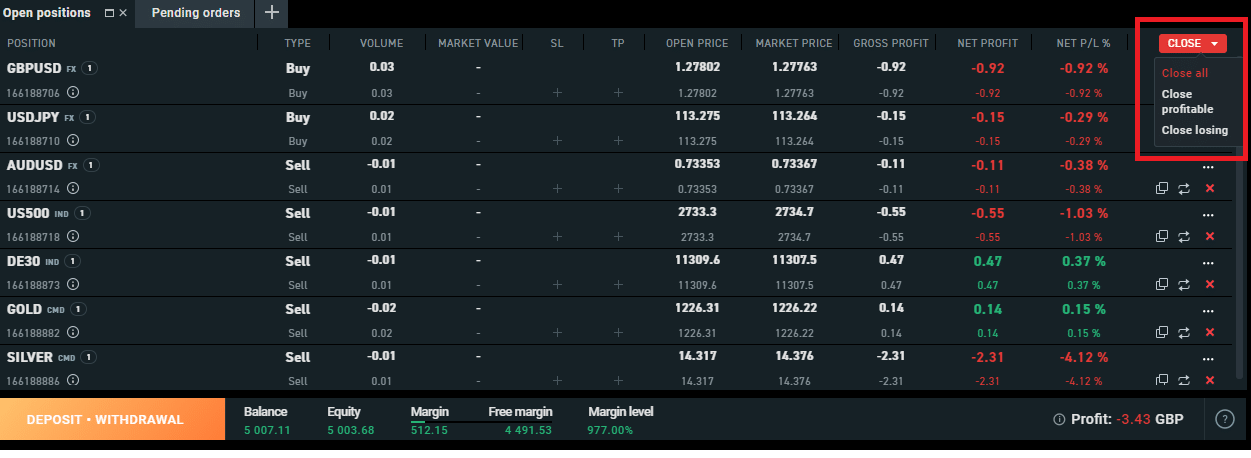
There are also some nice close-off features, so you can close all your CFD positions in one go, or if you want to cut your losses, just close the losers, or if you want to lock in profits you can just close your winning trades.
There is a lot of educational content on how to trade from various independent “experts” such as Tom Hougaard, Lee Stanford. As well as different courses on how to understand specific aspects of trading like technical analysis and trading psychology.
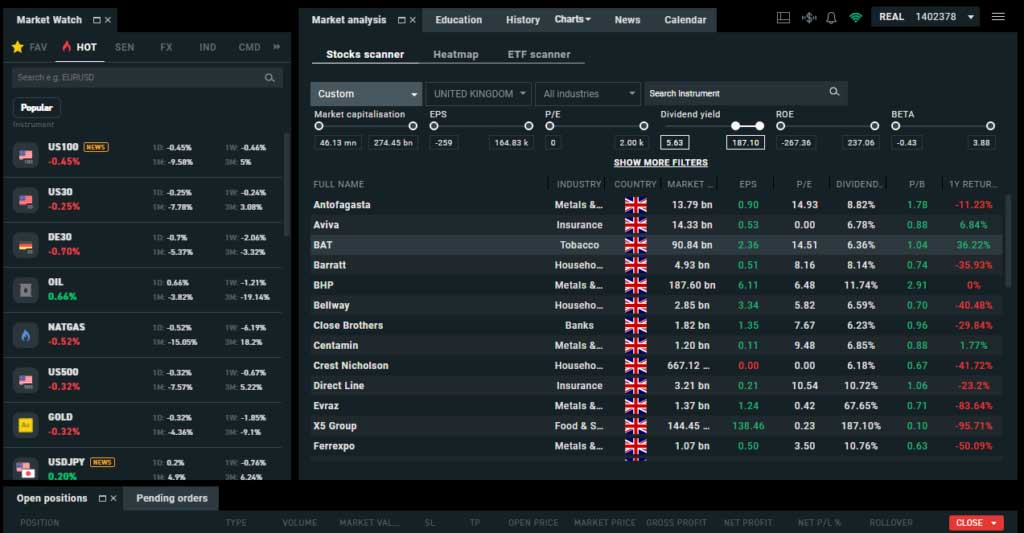
You also have a comprehensive suite of CFD trader tools like constantly updating market analysis including stock screeners, heatmaps and ETF scanners to help you pick out new trades. There is also an integrated news feed and economic calendar so you can check for upcoming events or news flow that may affect your open positions.
Is XTB CFD trading real DMA or OTC?
When you trade CFDs with XTB you are not buying or selling real shares, instead, you are entering into a contract for the difference between the opening and closing prices of your position with the broker. However, if you would rather not trade on fake prices you can buy real shares with XTB's investing plans.
XTB’s CFD trading platform offers access to a well over 2,000 CFD markets including 57 forex pairs, 22 commodities and 25 indices as well as UK, US and international stocks.
XTB News, Analysis & Trading Ideas
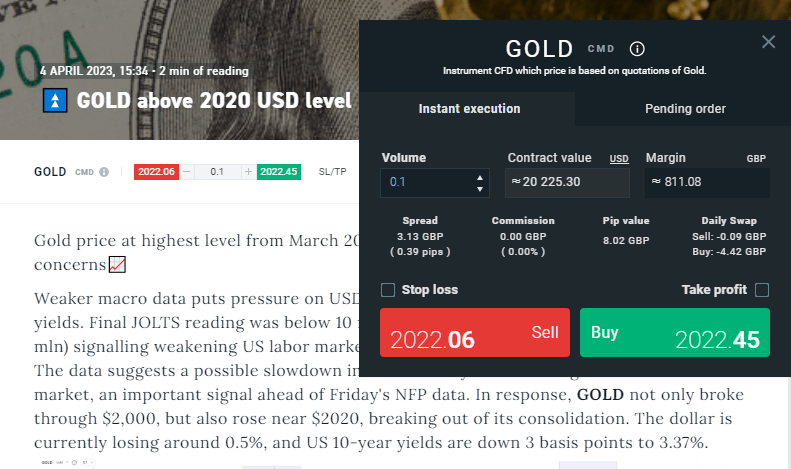
All brokers have news, technical analysis, economic announcements and fundamental data. Most even have RanSquark (where your computer shouts at you every time there is a market figure), but XTB also has an integrated dealing ticket so you can trade quickly from the analysis. You can see below in their recent Gold analysis. You can either place a market order to go long or short at your saved standard lot size or bring up a dealing ticket to work a limit.
Post-Trade Analysis
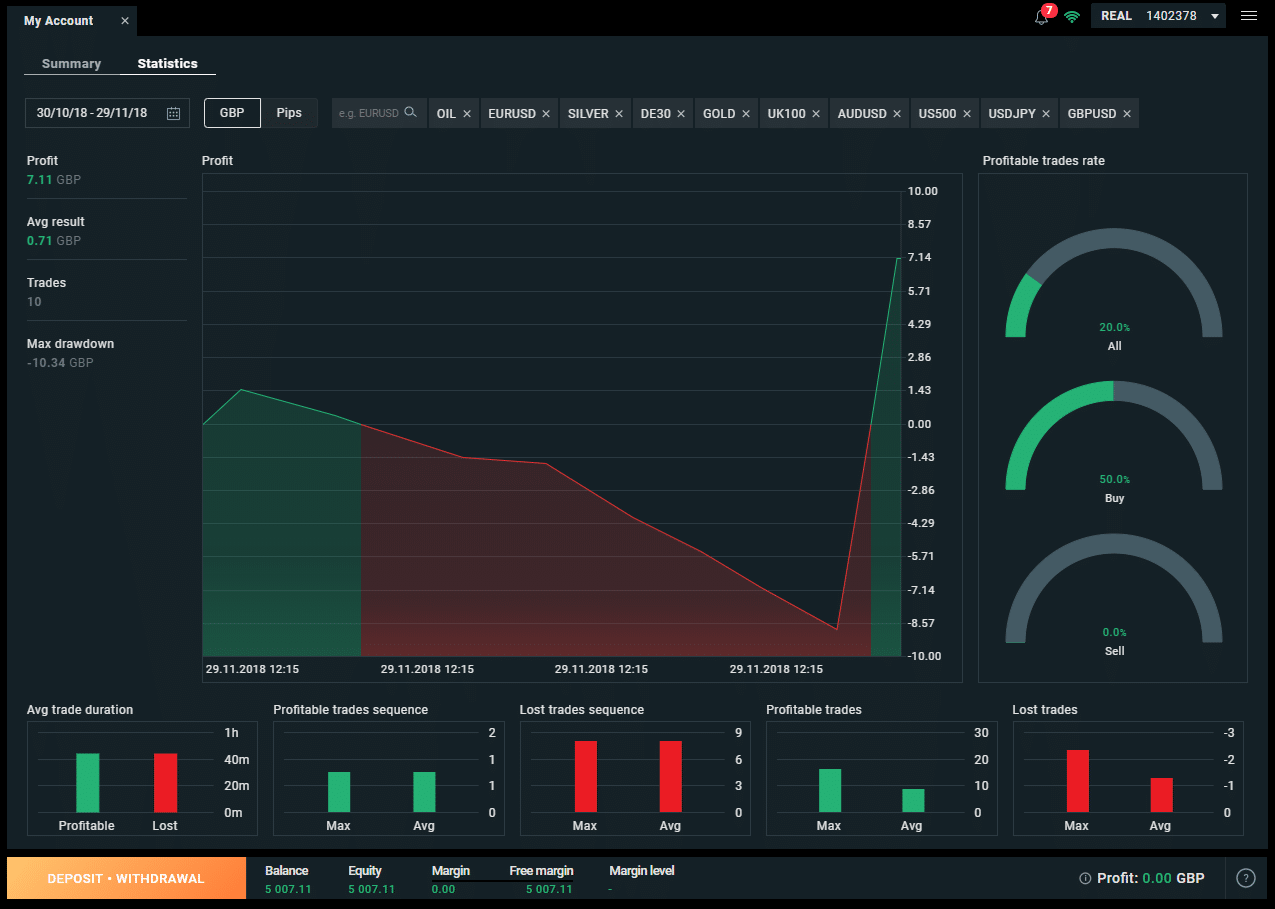
See a breakdown of what markets and trades you make or lose money.
XTB was one of the first brokers to introduce post-trade analysis, and this sits nicely alongside their ethos of trading to educate their clients rather than churn and burn them. You can see a recap of your previous trades in your account settings. This gives a very visual representation of which trades you make and lose money on. This is a really interesting feature because, as we all know, it’s hard to make money trading. But oddly enough it’s not that hard to pick winners.
Picking on Josh again, we highlighted an article he wrote (The truth about whether trading is actually winnable) way back in 2014, showing that the profitable trades were around 60%. It’s just that the losses were larger than the profits. This suggests that it is a post-trading strategy that is the issue. Not picking trades. So, by using this section to evaluate which trades you most frequently win on you should be able to improve your overall trading strategy.
Account Base Currencies
You can change your base currency in XTB by setting up different sub accounts.
This may not seem like a big deal on the surface, but it’s actually a really nice feature. One thing traders never really take into account when trading international markets is currency exposure.
Even when trading Forex, traders tend to just look at what is happening on the chart and not the overall economic climate. Trading profits are hugely affected by currency exposure and in some cases can wipe out profits. Also, as tight as deliverable foreign exchange rates are becoming they are still always never below 0.5%.
So if you are in the UK with GBP on account and trading US products your P&L will be in USD. This will then have to be converted into GBP before you can withdraw (unless you want to be at the mercy of your banks tourists rates (which you don’t)). But, if you go to your 'My Accounts' page you can open up sub accounts in GBP, USD, or EUR. So, if you have a strategy that mainly relies on non-local currencies you can reduce your FX fees and currency exposure.
You can also change the currency in the dealing ticket, between local and base currency, which can give you more control over your position exposure. This is particularly helpful, when FX markets are volatile.
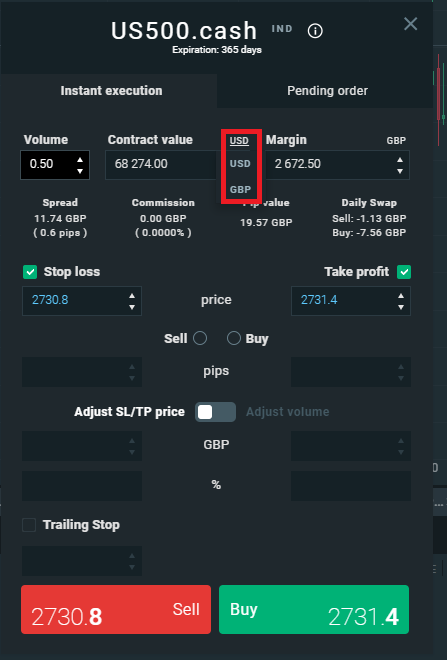
Chart Grids
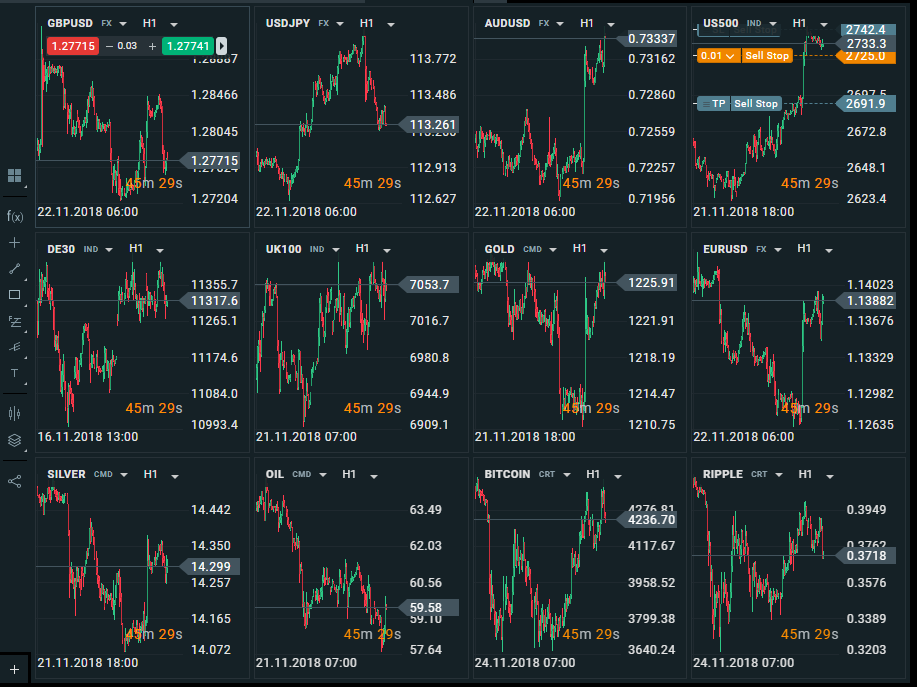
You can get an instant macro market overview in XTB with grid charts.
When I first started off as a stockbroker many decades ago we used this pricing system called QTS. It’s long gone now, but it had this great feature where you could get a grid view of a market with a single click. It was a great default view so you can instantly see what was going up or down without having to have multiple screens up.
I know you can set this up manually on most other brokers, but other than CMC, I don’t think it’s that easy anywhere else. XTB, have a really nice feature where you can see all your open charts as a grid. A very handy visual overview of what is going on.
Plus, if you’ve got a pending order you can see the levels on the chart. When I took the below screenshot I had a working stop entry in US500 (top right).
Trade From The Charts
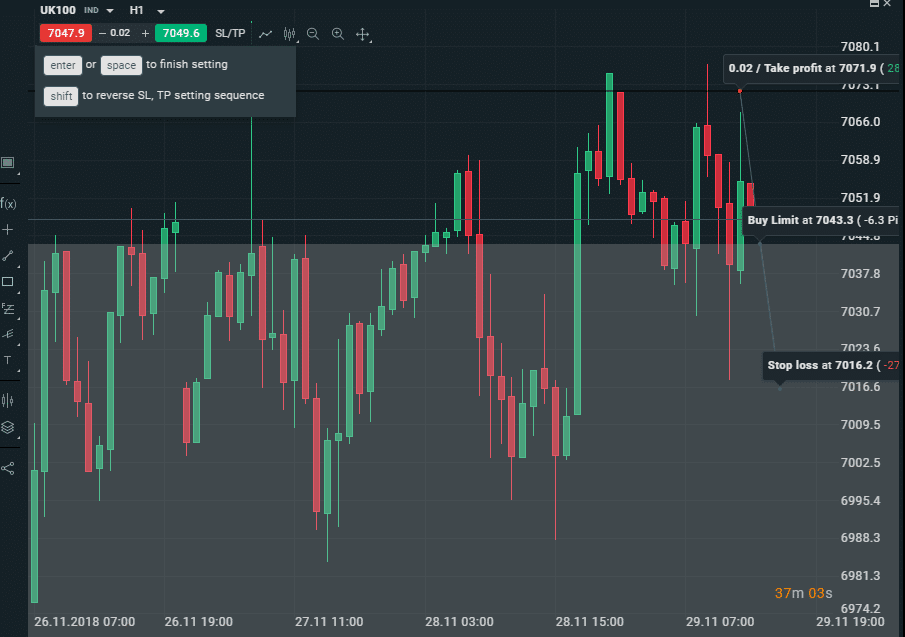
You can add market orders, stops entries, limits and stop losses by clicking directly on the charts.
A lot of other brokers let you trade from the charts, which is an almost essential feature. Because let’s face it, you either place stops at support and resistance levels or base them on how much you want to win or lose. So it’s quite nice to set your P&L limits then move your orders based on what the chart looks like.
However, what is unique to XTB (as far as I know) is the ability to place stop entries, stop losses and limits straight onto the chart.
The first click is where you want to buy, second your stop loss and third your limit. You basically draw your trade on the chart and it is created in the dealing ticket.
Closing Off Positions
You can close all, profitable or losing trades in one go
This is a nice feature to end off our XTB review. When you are done for the day, or popping off to the shops, you can select what trades you want to close.
It’s really annoying when you have to click on twenty different trades to close them out when you want to be flat. So on the XTB 'Open Positions' tab you can choose to close either all your trades or just the duds that are losing. Or, you can bank your profits by closing all the winners and leave your losers to either get stopped or reverse. But I shall leave it to you to decide if that is a sensible trading strategy.
Customer reviews for XTB
Customer ratings come from reviews left on this site. Every review is read and approved before it is published.Based on 139 reviews
- Excellent77%
- Very good12%
- Basic7%
- Poor2%
- Bad2%
Read customer reviews
4/5
Pros:
NIL
Cons:
lower prices
3/5
Pros:
It has good academic resources
Cons:
they need add pre and post markets for the stocks market
5/5
Pros:
Excelent plattform
Cons:
Augment the trading instuments, though they have a lot
5/5
Pros:
support
Cons:
mid range stocks
5/5
Andrew @ 04/21/2021 10:34
Serious broker. No one of those pushing you for funding. I'm actually surprised with their onboarding team, very helpful.
Thank you.
Jeff @ 03/25/2021 05:03
Very reliable broker, I've recently discovered their xstation mobile, what a gem.
Recommended!
Selcuk KILINC @ 03/21/2021 01:48
I never lost money with XTB. But buy-sell price difference are sometimes too high on some pairs.
Sophie @ 03/19/2021 07:26
I'm not a professional trader, but I'm learning so much with their trading material. Very helpful costumer service, thank you!
Sophie
Mariusz @ 03/18/2021 05:56
A lot of stocks, daily news, 0% fees for etfs. I love it and recommend it.
Tom @ 03/17/2021 08:40
Great trading platform, both desktop/web and mobile. Great uptime and super fast in comparison with other trading platforms.
dorota @ 03/16/2021 10:17
Excelent customer service and trading platform.
kakrzys @ 03/16/2021 10:58
Very satisfied with the broker, good selection of stocks and very trustful.
Mario @ 03/17/2021 04:12
best platforms.
Daily news, support etc. Highly recommend.
Maciek @ 03/17/2021 05:10
Nice app but still Got some missing features. But for me its better then others (using two apps of my banks)
Johan @ 03/17/2021 06:17
Lots of materials to learn from. Great user service. I received a phone call from them and was asked if everything is clear and understandable.
Koray @ 03/16/2021 05:31
Very best broker, and trusted.
Phil Jackson @ 03/16/2021 06:17
Great platform
Superb webinars, Walid Kaudmani and the others really help with my trading.
Waldemar @ 03/16/2021 09:42
Great brokers, xstation5 is easy to use,
Daily news, support etc. Highly recommend.
Chinedu @ 03/16/2021 10:08
Great broker and easy to use platform. Withdrawals are trouble free and the customer service is probably one of the best.
XTB CFD Trading Review

Richard is the founder of the Good Money Guide (formerly Good Broker Guide), one of the original investment comparison sites established in 2015. With a career spanning two decades as a broker, he brings extensive expertise and knowledge to the financial landscape.
Having worked as a broker at Investors Intelligence and a multi-asset derivatives broker at MF Global (Man Financial), Richard has acquired substantial experience in the industry. His career began as a private client stockbroker at Walker Crips and Phillip Securities (now King and Shaxson), following internships on the NYMEX oil trading floor in New York and London IPE in 2001 and 2000.
Richard’s contributions and expertise have been recognized by respected publications such as The Sunday Times, BusinessInsider, Yahoo Finance, BusinessNews.org.uk, Master Investor, Wealth Briefing, iNews, and The FT, among many others.
Under Richard’s leadership, the Good Money Guide has evolved into a valuable destination for comprehensive information and expert guidance, specialising in trading, investment, and currency exchange. His commitment to delivering high-quality insights has solidified the Good Money Guide’s standing as a well-respected resource for both customers and industry colleagues.